Automation Toolkit for Marmoset Toolbag 3 - PRO
Description
Automation Toolkit is a Marmoset Toolbag 3 Add-On that allows you to automate your workflow in Marmoset Toolbag.
The purpose of the tool is to save time avoiding repetitive operations on multiple objects.
It can be also used by command line (just basic support at the time being), so you can easily integrate this tool with your pipeline.
Some of the current features:
- Mass Load Meshes From a Folder
- Create Automatic PBR Materials From a Folder
- Do Automatic Materials to Meshes Assignment (support for both High Poly and Low Poly), support for multiple meshes/materials assignments
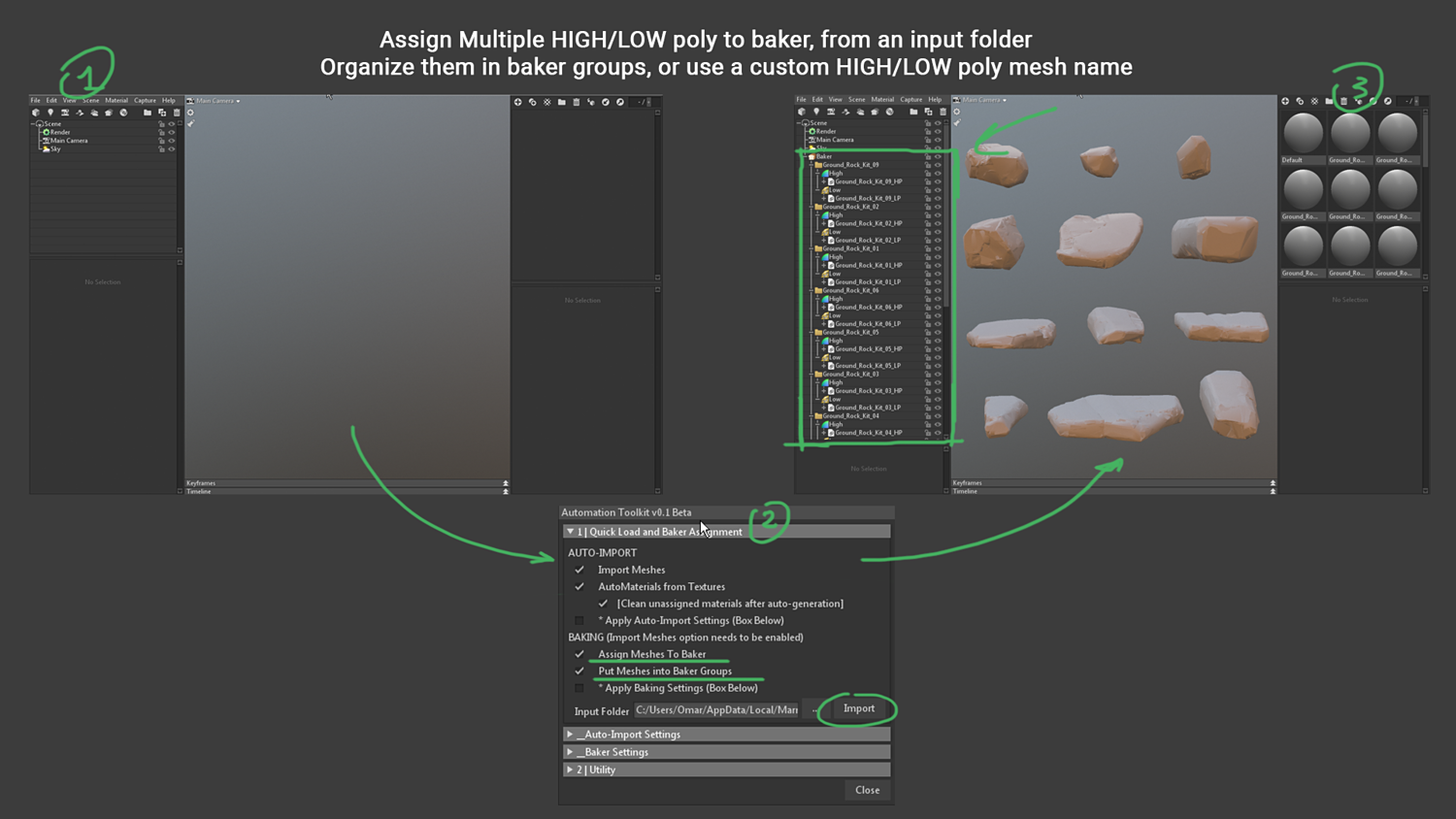
- Do Automatic Low/High Poly Meshes Assignment to Baker Object/s after importing
- Customize import meshes/textures names
So, let's say you have a folder with quite a few meshes, and you want to bake them all.
You just have to select the input folder, the plugin will take care of :
- load each mesh
- assign multiple low/high poly to baker object and/or groups
- bake them all using customized baking settings
Or let's say you have a folder, with quite a few meshes, and you want them all in marmoset with textures and materials assigned.
Then, after you selected the input folder, the plugin will take care of:
- load each mesh
- load each texture
- convert textures into materials
- recognizing each material, and then assigning each material to the matching imported meshes
Another way could be to use the command line to automate baking from a folder! : )
Content
Automation Toolkit Add-On compatible with Marmoset Toolbag 3.05
Installation Instructions
How to use Instructions
Installation
Open Marmoset.
Go into your Marmoset User Plugin folder.
( You can find it under Edit -> Plugins -> Show User Plugin Folder )
Copy the "Automation Toolkit" folder and paste into Marmoset User Plugin folder.
Restart Marmoset or click on Edit -> Plugins -> Refresh.
You'll find the plugin under Edit -> Plugins.
Enjoy :)
Important Notes
The current release is compatible with MT 3.05 and has been tested on Windows
Source Code is readable/editable
Installation Notes are inside the package
Future updates will be Free
Special Price
Since the Add-On is still in Beta you can get the pro version at special price of $6 for a while.
Need Helps?
If you encounter any issue, if you want to report a bug, or if you just have any question drop me an email at [email protected]
I'll answer you as soon as possible!
You will get 1 file
All files previously purchased will always be available for download in your Library