


Welcome to Cubebrush 3.0
Welcome to Cubebrush 3.0, our biggest update so far. We redesigned every page for phone and desktop. Product pages now change layout based on the type of product. The seller tools also read your files and fill in product details for you.
Everything you own, follow, and sell carries over. Your library, purchases, and store are where you left them. It's been a massive challenge for our small team, but I think we cooked. Here's what changed.
01
A faster, cleaner Cubebrush
Our new layout now fills your screen from side to side, and overall just looks a lot better (I think!).
Pages are lighter and load faster. Things are organized better and the experience is significantly improved over the previous version.

Dark or light
Beautiful dark or light themes. On a phone, it follows your phone's light or dark setting. You can switch modes with the sun or moon icon at the top of the page or in the account menu. The setting applies to every page. Basic, but nice.

Human-made
Cubebrush still doesn't allow AI-generated content on the marketplace. We're proud to be the only platform that isn't polluted by it.
02
A new mobile website
Cubebrush now has its own mobile website, built for phones (finally). Search, cart, and menu sit at the top of every page and come back as soon as you scroll up.
You can browse, buy, follow artists, and actually manage your store from your phone!

03
Product pages by product type
Each product type now has its own product page layout! 3D models show their formats and polycount. Courses list their chapters. Brush sets show stroke samples, and audio packs have a player.
Cubebrush reads these details from the seller's files when they upload the product.

Courses
Chapters and lessons appear in the order the creator set. Free preview lessons can also play on the product page.

Image packs
Sellers choose up to 24 previews, and Cubebrush watermarks them. The rest of the pack shows as a blurred index until you buy it. A little tease.

Audio
Audio packs have a player with a waveform and a track list that shows each track's BPM and key. Every track has a 30-second preview.

04
Posts for every profile
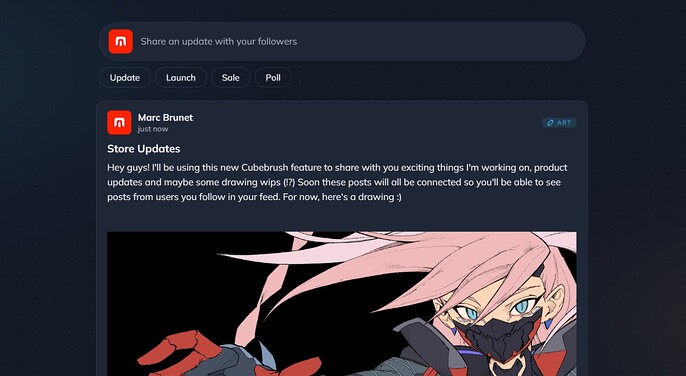
One big change in the new Cubebrush is the launch of posts for every account. Every Cubebrush profile now has a Posts feed, for members and sellers alike. You can share work in progress or other updates with your followers.
Sellers can use Posts to tell customers about new and upcoming releases, sales, or anything else they're working on. You can attach products to a post and pin one post to the top. Followers see posts in their feed. Anyone who visits your store can read them on the Posts tab. I've been wanting a tool like this to communicate project updates forever!
05
New bundles
You can group any products in your store into a bundle and set a discount. Each bundle appears on your store's Bundles tab with its products, total price, and savings.
You can also show a bundle as a row between your regular products. Buyers can add the whole bundle to their cart in one click.

06
Upload with auto-detection
Adding a product now starts with uploading your files, rather than filling up some text fields. While they upload, Cubebrush lists what's inside and detects the file formats and software. It suggests a category, tags, and a page layout. It also picks a cover from your preview images and flags content that may need an 18+ label.
Cubebrush adds these details to the form, and you can confirm or change each one. You can keep editing while Cubebrush reads your files, and you can publish or save a draft at any time. Less time uploading = more time creating! Mind blowing.
07
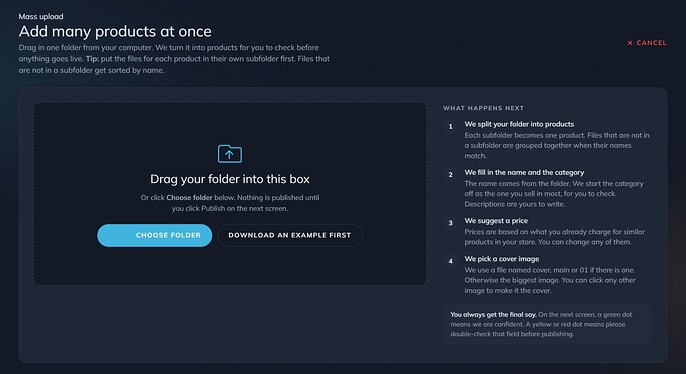
New mass upload
Mass upload also has had quite the glow-up. It now lets you add many products at once. Upload a folder, and Cubebrush groups the files into products. For each product, it drafts a title, description, category, and price based on similar products on Cubebrush.
You review each draft, fix anything flagged, and publish them together. A massive time saver for creators with large libraries. If your folders are a mess though, this won't unfortunately work miracles...
08
20% commission for partners
The Cubebrush partner program now pays 20% commission on sales you refer. Share a Cubebrush link anywhere, such as in a video, post, bio, or DM. If someone buys within 30 days of clicking your link, you earn 20%. That includes every products, even those you didn't link to.
For example if you share a link and a person ends up purchasing something from a different store entirely, you would still be considered a referral for that sale. You would collect your 20%. It can add up quite fast, to quite a lot.
There's no limit on earnings, and you don't need to make content to join. To apply, you need more than 100 followers on at least one site.

Become a partner
We have more planned after this release. Tell us in the comments what you think and what you'd like to see next.
Thank you for being part of Cubebrush.
-Marc & The Cubebrush team