Description
⏱️ Quick Gesture, my new app!
UPDATE 8/24/26 - New Ver. 1.2.0 released - skip & copy references, drag and drop, session recap, smart breaks, breathers, always-on-top, and a little confetti
UPDATE 8/3/26 - New Ver. 1.1.0 released - minor UI improvements
Timed drawing practice, using your own reference folders
Point it at a folder on your drive and start drawing. Quick Gesture runs the clock, changes the image, and tracks how much you have practiced. The app saves all your settings so you can always jump right back in. No uploading, no account, no connection needed.
A tool from ART School.
Your folders, not someone else's library
Browser based drawing timers ask you to upload your references, or to work from whatever stock library they have. Your collection is already on your drive, sorted the way you sort it. Quick Gesture reads those folders directly, subfolders included — or skip the picker entirely and drag and drop folders or loose images straight onto the window.
Four ways to run a session
- Fixed time | Every reference gets the same length of time. 30 seconds to 10 minutes, or set your own down to the second.
- Gets longer | Starts with fast poses and builds up to longer ones, the way a life drawing class runs. Pick 30 minutes to 3 hours and it builds the ramp for you — one hour comes out around 29 drawings.
- One image | A single reference for the whole session, 10 minutes to an hour.
- Custom | Set the number and length of each group yourself, with breaks wherever you want. Ten at 45 seconds, five at 2 minutes, a break, one at 20 minutes. Save the session to a file to reuse it, or send it to a student.
Prefer no countdown? Fixed time and One image sessions have an ∞ option: the timer disappears and you move to the next reference when you are ready.
While you are drawing
- Flip and grayscale to check your drawing and read values
- Grid overlay in thirds, quarters, or a center cross
- Pause and resume with a click on the image
- Skip a reference you don't want to draw — it doesn't count against your session, and the timer restarts on the replacement
- Copy the reference, or drag it straight out of the app, to paint over it in your own software
- Breathers — a few optional seconds between poses to shake out your hand
- Smart breaks — a proper rest every so many minutes of drawing (or every so many images), on a schedule you set
- Keep the window on top of your painting app, with adjustable opacity
- A timer that stays visible, even after the toolbar hides itself
- An audible count through the last five seconds, with its own volume control
- No screen sleep in the middle of a pose
When the session ends you get a recap of every reference you drew — click one to find it on disk, or drag a favorite straight into your painting app for a longer study. And yes, there's confetti. You earned it.
It keeps a day streak, total hours drawn, and a twelve week history, all stored on your machine.
The details
- Platform | Windows 10 and 11, 64-bit
- Formats | jpg, png, gif, webp, bmp, avif
- Capacity | Up to 20,000 images across nested folders
- Install | Full installer, or a portable version that needs no install
- Extras | Folder presets, shuffle or folder order, full keyboard control
- Size | Around 95 MB
- License | One purchase, no subscription, no license key
Before you buy
Windows only. There is no Mac version.
Bring your own references. No image library is included.
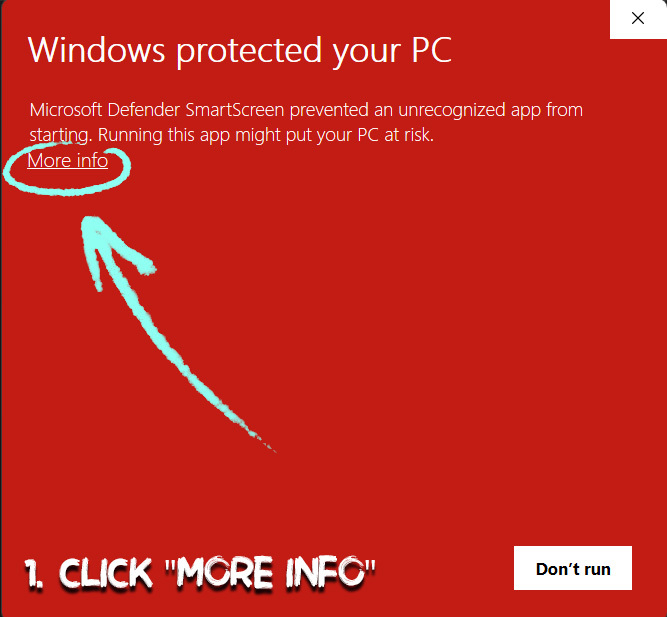
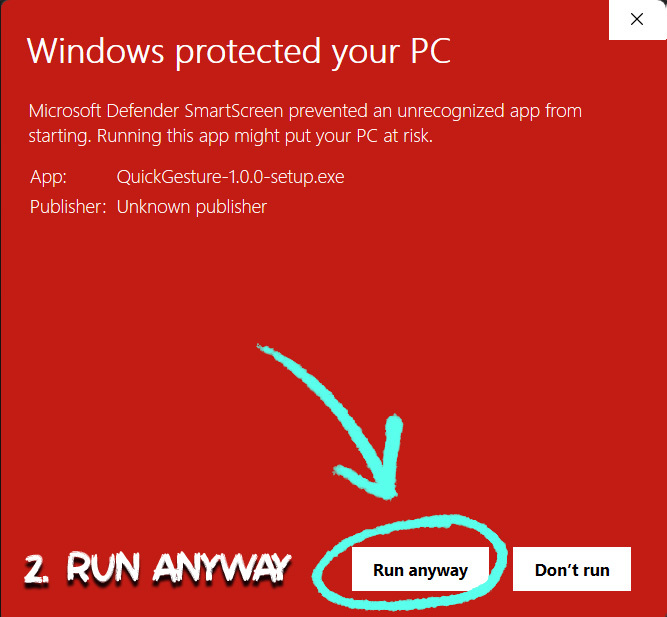
Windows shows a warning the first time you run it.
Quick Gesture is not code signed, so you will see a blue/red "Windows protected your PC" screen. Click More info, then Run anyway. You see it once, when you first run the installer.
Signing certificates cost several hundred dollars a year and, since 2024, no longer remove this warning for new apps. That money went into the app instead! Don't worry, there's no malicious software in there.
Also available on the Microsoft Store https://apps.microsoft.com/detail/9nfvtch5c0xk - without the SmartScreen warnings (although it's exactly the same), for 2$ more because of Microsoft fees.
Questions
Do I draw inside the app? No. It shows your references and runs the timer. You draw on paper or in your own software, beside it or on a second monitor.
Are my images uploaded anywhere? No. They are read from your drive and never leave it. The app works fully offline.
Can I install it on more than one computer? Yes. There is no license key or activation.
How do I update to a new version? Just run the new installer — it replaces the old version in place, no need to uninstall anything, and your settings, presets and history stay. On the portable version, simply swap the old exe for the new one.
What if my folder has fewer images than the session needs? It loops and reshuffles, so a folder of 20 can run a session of 100.
Quick Gesture is made by Marc Brunet, part of the ART School range.
You will get 1 file
Instant download · 1 file · 99.7 MB total