

TLDR: Watching tutorials but not improving? Here's what's missing:
- How to pick the right tutorial for your actual problem (process vs. product, concept vs. workflow)
- What it actually takes to absorb and apply what you're learning
- How to go beyond the video — practicing, iterating, and making the lesson yours
- Why revisiting old tutorials as you improve can unlock entirely new insights
We’ve all got that friend whose solution to everything is to sign up for classes—and they always seem to get better fast at whatever they’re doing. Whether it’s a five-class botanical illustration seminar or a semester of pottery 101, by the end, they’ve got some tools, know-how, and a few big skips past things that would take weeks to figure out from YouTube or TikTok.
So why aren’t you making that kind of progress from digital art tutorials?
The truth is, you can! If you use them correctly.
There are lots of incredible tutorials on Cubebrush, and learning from your screen has a totally different flow to it than sitting in a lecture studio. By choosing wisely, reviewing with intention, and seeking out better tools for your goals, tutorials can be some of the best investments you’ll ever make.
Picking the Right Tutorial
You’ve probably noticed that “tutorial” can be a pretty broad term. A quick search on Cubebrush will bring up everything from a time-lapse shortie to multi-module courses that resemble a college curriculum.
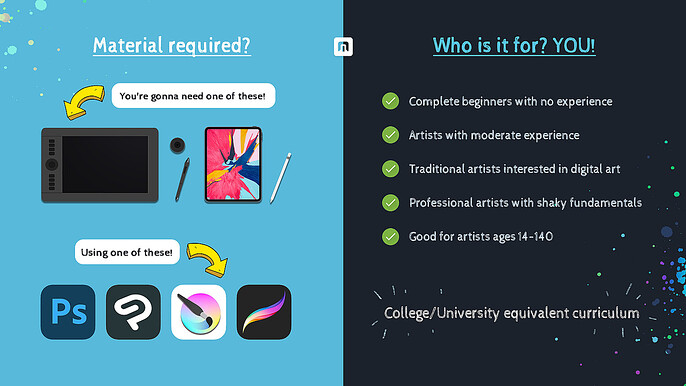
Unlike a traditional art school degree, nobody tells you what classes to take and in which order when you’re learning on your own. Getting the most out of your tutorial starts with asking yourself the right questions:
- What do you want out of it? Do you need some fast answers to use brushes more effectively, a better understanding of a concept like color theory, or a broad foundation of traditional artistic skills?
- Are you looking for process or product guidance? If your 3D model doesn’t look right because of how it's rigged, a tutorial on modeling and texturing might not do much for you.
- What’s your learning style? Tutorials are as varied as the people who make them. Are you an auditory learner or a visual one? And do you prefer an instructor/student style or a collaborative vibe?
- How much should you spend? Depending on the subject, tutorials on single concepts tend to range from $5-$20. For more comprehensive programs, expert content, and live instructor-led seminars, you can pay significantly more—and get incredible returns!
Getting the Most Out of Your Tutorial
Once you’ve made your selection, it’s time to hit play and start learning. In 60-80 minutes, you’ll be knocking out better art than ever, right?
Maybe… but it will probably take a little more work than that.
The biggest thing to remember about tutorials is that they are self-led learning.
Yes, you’ll be given a lot of amazing information and tips, but it will take some time to digest and apply those skills. You’ll need to be an active participant in your learning experience to make steady progress.
Tutorials are most effective when users:
- Review. The great thing about videos is you can skip straight to the key info you need and watch it over and over again.
- Practice and compare. No matter how clearly a teacher explains it, you’re still the one holding the stylus. Give yourself space to sketch and evaluate how your work matches the example.
- Find similar examples. Many tutorials just cover one application of a principle. Your biggest breakthrough could come from seeing how other artists apply it.
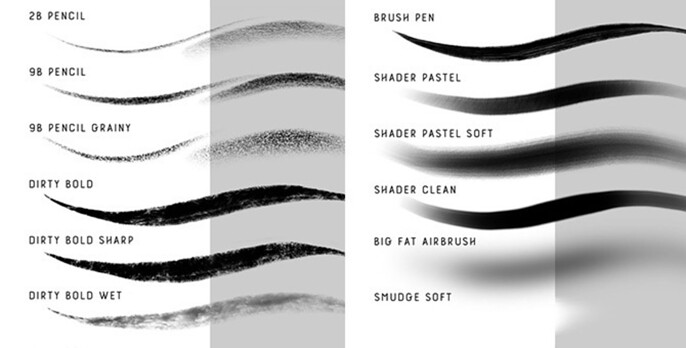
- Check your tools. You usually don’t need an identical brush to get good results, but the wrong tool can be a frustrating mess. How important is the pen to the final product?
Going Beyond the Video
Tutorials can be literally life-changing when you’re struggling with software or searching for secrets that make your favorite artist’s work pop. But no tutorial can give you everything. After all, this is your journey!
Mastering the skills you learn means making them a part of your art, not just reproducing someone else’s.
Here are the things great artists do to go beyond the video and revolutionize their work.
Bounce Ideas off Other Artists
Talking to friends about what you learned is one of the best ways to fill in gaps and get some practical tips about what works and what doesn’t. Do you have a go-to forum or community? It might be time to find your home!
Put Your Fingerprint on It
Tutorials can give you the workflows and concepts you need to improve your art—but they almost never create exactly what you have in mind. Find ways to make those lessons your own with the right brushes and techniques.
Take Time Away and Revisit
A great tutorial will give you what you need today, but after six months of progress, you might see it in an entirely different light! The beauty of digital materials is that you can come back time and time again with wiser eyes.
Launch Your Digital Art Career on a New Trajectory
The best artists never stop learning. In fact, they’re often the ones who are best at it! We’re all going to be discovering new things and finding fresh perspectives as we go along, and Cubebrush is making it easier than ever to find all the resources you need.
With over 1.5 million members of all skill levels on our forums, there’s a place for every artist to connect with inspiring creators and helpful friends. In fact, many of them are behind the 12,000+ storefronts where you can find the perfect brushes, tutorials, and assets you’re looking for to take your art to the next level. Start exploring Cubebrush today and set your work on a new trajectory!