


Is today the day you’ve decided to become a digital art entrepreneur on Cubebrush? It’s exciting to take the plunge, and before you know it, you’ll be making your first sale!
Of course, it takes some time and energy to create a product, open a storefront, and begin marketing your work. Becoming a successful business owner naturally comes with a learning curve, and there are a few savvy selling secrets to discover along the way.
Fortunately, Cubebrush makes it easy to get started with a flexible, intuitive platform, plenty of support, and a member base of 1.5 million digital art enthusiasts across every style and genre imaginable. And by following this beginner’s guide, you can get the best launch possible for your first digital product.
Check out a complete guide to making money on Cubebrush here.
Step 1: Understand What You’re Selling
No matter what you’re into in terms of digital art, you’re guaranteed to find a community of enthusiasts who might be interested in what you’re creating. Perhaps you’ve got the perfect workflow tutorial for a super niche crowd? Or is it a killer set of brushes every artist should have in their arsenal?
What you choose to sell will have a big impact on how you structure the rest of your business, so it’s helpful to understand where your product fits in.
In general, digital products on Cubebrush fall into one of the following categories:
- 3D Assets. These include rigs, models, 3D printable sculptures, and game-ready assets.
- 2D Assets. Backgrounds, overlays, and game-ready sprites are just a few of the options you’ll find on Cubebrush.
- Tools. There are brush packs, texture bundles, and smart materials for almost any project and platform you can imagine.
- Resources. Reference pics and stock photos are some of the most popular sellers.
- Tutorials. Whether it’s a start-to-finish project video, helpful CG training, software navigation lessons, or a full-on digital art course, tutorials are essential for growing artists.
You’ll also want to spend some time looking around Cubebrush to see what similar products in your category are selling for. Read reviews, get a price range in mind, and take a look at how they’re being marketed.
Here are the types of products that sell best on Cubebrush.
Step 2: Create Your Storefront
Opening a store on Cubebrush starts with requesting an invitation. Once you click, you’ll be prompted to send some links to your portfolio and a description of what you’re planning on selling.
You’ll typically get a response within a few hours.
If you’re accepted, you can have your free storefront up and running in just a few minutes. Add your profile, a short bio, some basic social media links, and drag and drop a photo that reflects your work to complete your look. You’re ready to go!
Looking for some slick examples? Take a look at the storefronts of top sellers like RaZuM_inc and AMcg.
Step 3: Upload Your Product
On your storefront, click the green bar below your profile that says “Add a Product”. You’ll be taken to a screen that prompts you to include some information about what you’re selling.
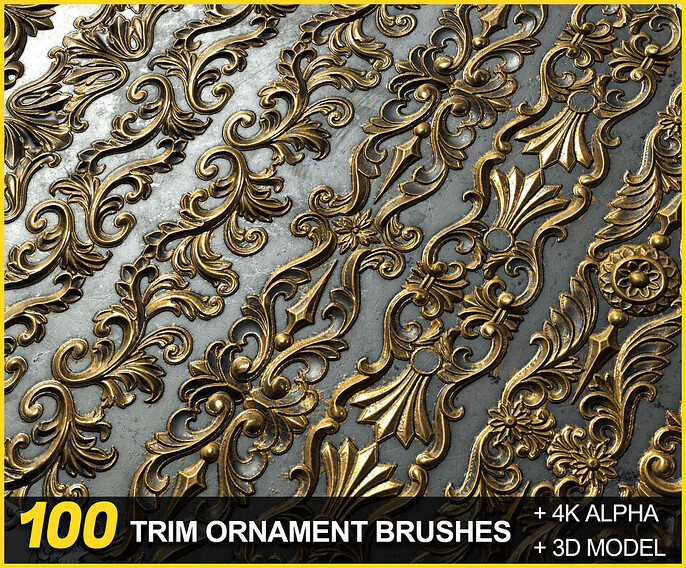
- Product Preview. Select an image or link highlighting your product. Make sure it features what buyers will get and keep any text away from important visual elements so it’s easy to see.
- Select Product Type. Is it 2D or 3D? Then, pick the category that best describes your product.
- Add a Description. Briefly describe your product, including important technical details, how artists can use it, and the benefits it provides.
- Additional Images. You can add multiple thumbnails that buyers can browse to get a better sense of what to expect.
- Set Your Price. Select something in the range you explored—and you can always change it later.
- Upload. Add all files that buyers can download after purchase.
That’s it! Hit “Publish Product” at the bottom, and your first digital art product is live!
Want some product profile inspiration? Sellers like sajedeh mohammadi, Mona Ghafourian, and Sakimi Chan have it nailed.

I’m Officially a Seller On Cubebrush—What’s Next?
Congratulations! Now that you’re open for business, you’ll want to let as many people as possible know about the amazing product you have available.
Market on Social
That means connecting with people you already know who might benefit from your product. Consider posting links and descriptions on your social media channels and sending messages to artists you know personally. Cubebrush also lets you create promo codes or offer free downloads to generate some usage and reviews.
Build a Following
Cubebrush has forums for digital artists where you can discuss your product and begin generating some followers. Community is a huge part of the platform, and these organic connections are where sellers can find out how to tailor their products to artists of all skill levels and interests.
Choose How to Sell
Finally, Cubebrush offers sellers two options for selling their product.
- Storefront Sales. These split revenue at 95% for you and 5% for Cubebrush + $0.50 per transaction.
- Cubebrush Marketplace. Sellers can take advantage of the Marketplace’s analytics and algorithms to get their product in front of lots of potential buyers in exchange for a 70/30 revenue split.
Become a Digital Art Entrepreneur One Step at a Time
It’s never been easier to start augmenting your income by connecting digital artists around the world with the tools and training they need to take their art to the next level. By joining the 12000+ storefronts on Cubebrush today, you’ll take an important step forward in your career as a successful creator and entrepreneur in the digital art world.
Ready to get started? Becoming a Cubebrush seller is only a few clicks away!
Already have a store? Here is why your products might not be selling and how to fix it.