


You’ve created the perfect niche brushes for artists in your genre, and they make a tricky technique feel organic and easy. Everyone can save time with these, and you’ve got a fairly solid following on Cubebrush to market them to.
But they’re not selling…
What gives?
Read more here: Why Your Products Aren't Selling and How to Fix It
Creating valuable assets like custom brushes, 3D models, or game-ready weapons can be a great way to start generating some relatively passive income as an artist—but only if you dial in the price. Too low, and people might underestimate the quality. Too high, and you risk disappointed customers and a reputational hit.
So how do you set a fair price for your assets that will intrigue buyers and give them great value in exchange for solid profits? Here are some solid strategies along with a few expert tips.
Read an in-depth guide here: How Artists Make Money on Cubebrush
Hard Numbers Tied to Value
Price setting starts with adding up everything associated with your product that can be directly measured in dollars. These include all of your direct costs as well as factors that are marginally subjective.
When setting your baseline value, you’ll need to take the following into account:
- Time. How long did it take you to create your asset? Can you apply an hourly rate to measure the overall expense?
- Production costs. Did you have to purchase any software, invest in training, or buy other tools to create your asset?
- Testing. A product has to work properly and be user-friendly if you want to avoid complaints—what did this process cost you?
- Other expenses. Some artists may need to account for travel, workspace rental, or a host of other minor costs that have to be offset.
Once you’ve identified all your expenses, add them up to find out the total cost of your asset.
Determining Your Profit Margin
Once you know what an asset costs, you can figure out how much profit you’d like to make on each download. This is a much more subjective part of price setting, and it takes a little research and strategizing to get right.
Benchmarking
This is just a fancy word for peeking around Cubebrush and finding out what similar products sell for. For instance, if you’ve put together a pack of 12 rusted metal textures, a quick search will tell you there are dozens of sets to choose from.
As you click through, ask yourself some basic questions:
- Is my product comparable to any other assets?
- Does it offer similar flexibility, resolution, and ease of use?
- Are there any features that set my product apart from the competition?
In most cases, you probably won’t find many exact matches, so just select three to five similar products to set a price range for your asset.
Determining Your Profit Margin
You won’t really be making a profit until your sales offset your costs, and the price you set will determine how quickly that happens.
A higher profit margin on your product means you’ll make more money with every sale—but it can slow down sales too. It often takes a little trial and error at the checkout, and the easiest way to find a starting number is to divide your costs by the number of sales you expect to make and add 5%-10%.
If you have $500 in costs and you expect to sell 100 copies, $5.50 might be a good number. Then, look around! Does it seem like that price lines up with similar assets?
X Factors
Finally, there are some highly subjective aspects to any asset that may make it worth more or less.
- Reputation. Are you a new seller who’s building your following, or do you have a strong track record of putting out excellent products?
- User value. Does your product solve a common problem or address a particularly frustrating challenge? Artists may pay a lot for an asset that saves them hours of tedious fussing.
- Quality. Is your product a low-resolution solution, or the last word in digital artistry?
- Utility. Is this something artists in many genres will use, or is it a niche product targeting a small pool of dedicated creators?
All of these aspects could be the difference between selling your brush back at $3 or $30. And at the end of the day, the market will decide!
Tips for Turning Assets into Assets
The truth is, you can go through all the steps we just discussed and still struggle to get traction with buyers. Fortunately, Cubebrush offers sellers a lot of angles to experiment with.
See what people are looking for here: What Types of Products Sell Best on Cubebrush
1. Marketing
A great product with lackluster marketing will probably struggle to get off the ground.
For digital assets, you’ll need to take time to create informative descriptions with stunning images that tell the buyer a story about how valuable your product will be. On Cubebrush, there are some best practices for creating product descriptions that can make a big difference. Also, you can promote product launches through emails, social media, and with digital discounts.
These activities may take time and money, so strike a balance against your product’s cost.
2. Storefront vs. Cubebrush Marketplace.
If you sell through your Cubebrush storefront, you keep 95% of your sale price, less a $0.50 transaction fee. However, all the marketing will be up to you. By selling on the Cubebrush Marketplace, you keep 70% of your sale price but take advantage of our marketing algorithm to drive your product to likely buyers.
Which one works better? Try them both and see what works for you!
3. Licensing
Cubebrush licensing allows sellers to tailor how buyers use their product to offer better deals. For instance, if you are selling 3D assets, you can offer a basic or commercial license depending on the intended application.
Getting it Right—A Look at Some Top Sellers
Sadie Lew
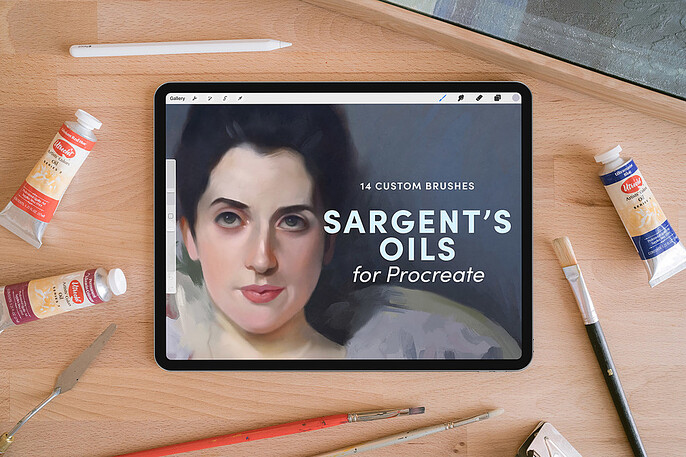
Sadie’s Sargent’s Oil’s for Procreate delivers big returns for a reasonable investment. She’s got great pics highlighting all 14 brushstrokes plus some finished examples, and the description makes it easy to understand how they’ll fit into your workflow.
At $6 for the set, it’s positioned well in an asset category with a wide range of products.
Mona Ghafourian
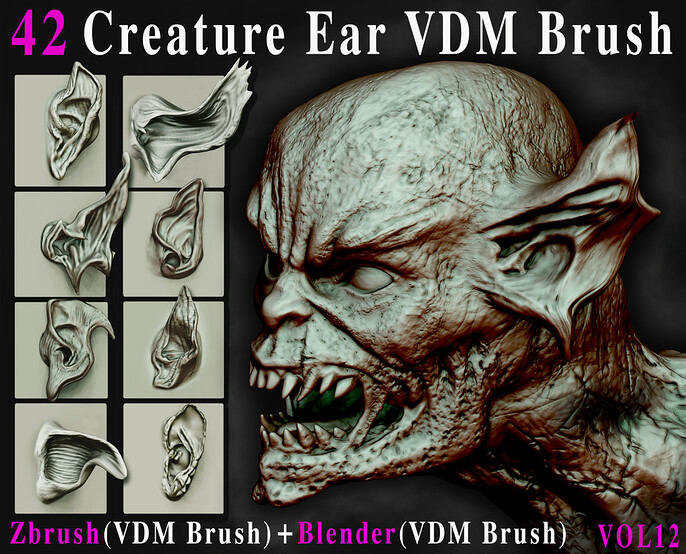
Smart materials like Mona’s Tongue, Teeth, and Gum Textures solve frustrating digital art challenges and deliver excellent results. With consistent branding and reasonable price points, it’s easy to link value to reliability and time saved.
Jesús Alberto Olmos Linares
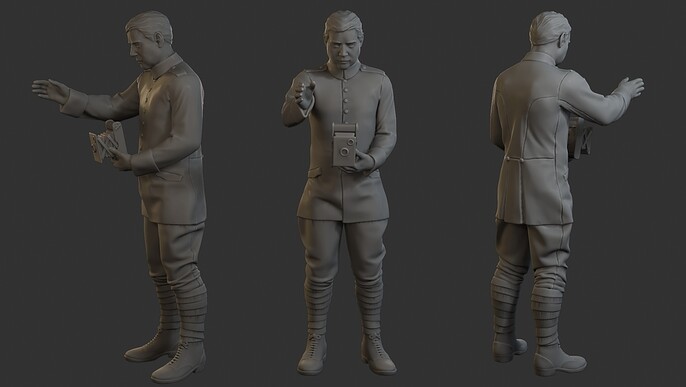
Who doesn’t love toy soldiers? You can spend hours creating your own 3D models from scratch, or for an average of $5 each, you can 3D print all the tank crews, officers, and footsoldiers your battlefield can handle.
Each set is high quality, he’s got a lot of options at his store to mix and match, and… they’re really fun!
Become a Pricing Prophet on Cubebrush
With a little experience and some inspired design, Cubebrush can help you turn your next asset pack into money in the bank. And with over 1.5 million members, you’ll find enthusiastic amateurs and seasoned pros in every genre imaginable looking for useful tools and quirky add-ons to improve their work and speed up their processes.
Ready to set up shop? Start connecting your assets and resources with the best community of digital art enthusiasts in the business.